The House in Your Pocket
Over a few evenings in July, my collaborator and I built a home-automation app that runs on every phone in the family, on the tablet bolted to our hallway wall, and in a stripped-down mode our kids can actually use — from a single codebase, in about two days. This is the first of four notes on how that happened. My collaborator, for the record, is an AI. It wrote essentially all of the code. I mostly pointed at things.
- Part 1 · The build — what the app actually does (you are here)
- Part 2 · The design — one look across three very different screens
- Part 3 · The workflow — what it’s like to direct a machine for two days
- Part 4 · The architecture — the engineer’s deep-dive
Our house has a name. Not officially — it’s just what the family calls the pile of home-automation gear that has accreted over the years: the heat pump, the ventilation unit, the lights on their industrial controller, a scattering of little wireless sensors, an electricity meter that knows the spot price hour by hour. For a long time all of that lived behind a web page running on a tablet in the hallway. It worked, technically. It was also slow, a little ugly, and nobody wanted to touch it.
What I actually wanted was simpler than “a smart home.” I wanted the app to be in everyone’s pocket — my phone, my partner’s phone, the kids’ phones — and I wanted the same thing, better-looking and faster, on the wall. And I wanted to build it myself, in the spare hours of a few July evenings, without hiring a team or spending a month on it.
That last part is where the AI comes in. I opened Claude Code — a coding assistant you talk to in plain language — described what I was after, and then spent two days steering. Claude wrote the app. I want to be precise about that, because it’s the whole point of this series: I did not write the code. I described, I corrected, I sent screenshots when something looked wrong, and Claude did the engineering. This first article is about what got built. The design and the day-to-day of that collaboration come later.
One app, three completely different screens
The hard trick, the thing that would normally make this a “proper project” rather than a weekend, is that the same app had to be three things at once.
On a phone it’s a normal app you scroll with your thumb. On the hallway tablet it’s a landscape dashboard — a wall display you glance at, not something you hold. And there’s a third mode, which I’m quietly proud of: a “kids” surface that hides almost everything and shows a giant button that says PUHU MARMORILLE — “talk to the house.” One codebase, written once, that rearranges itself depending on where it’s running. Under the hood that’s a framework called Kotlin Multiplatform with Compose, which is a fancy way of saying: write the app a single time and it runs natively on both Android and Apple hardware. No separate iPhone version, no separate Android version. One thing.
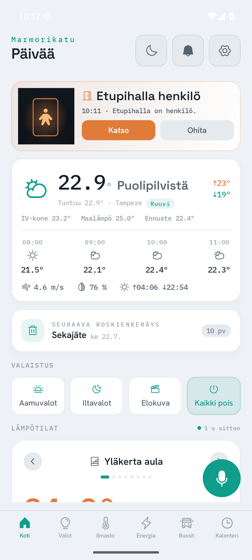
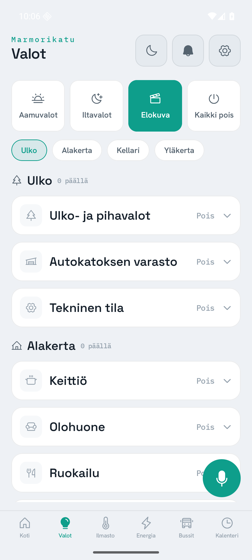
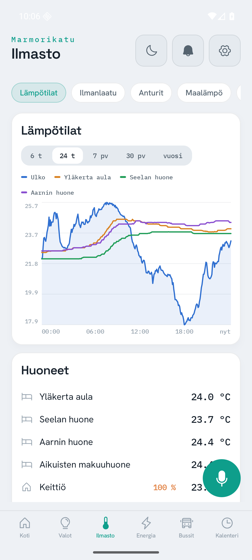
Day one already had a working app running against the real house: tap a light in the app, the actual light in the actual room comes on. By the end of that first day I could also talk to it in Finnish and have it answer. That still feels slightly unreasonable to write down.
It shows the whole house
There are seven screens, each a different corner of the house. The home screen greets you and surfaces anything that needs attention — if a door camera has just seen someone, that’s the first thing you see. Lights groups every light by floor and room. Climate is the biggest one: room temperatures drawn as a graph, air quality (humidity, carbon dioxide, fine dust) on little dials, the ventilation unit as a live diagram, and the ground-source heat pump. Energy shows the electricity price for the day as a bar chart and what the house is actually burning through, appliance by appliance. There’s a Buses screen — genuinely useful, live departures from the stops near us so you know whether to run. A Calendar that merges the family calendar with the rather important question of which bin goes out this week. And an Events feed of everything the house has announced.
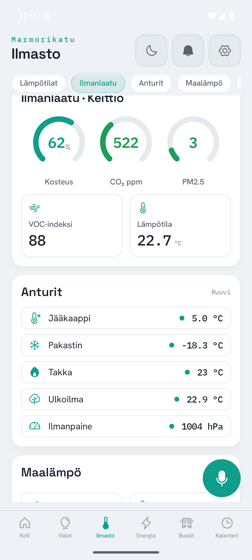
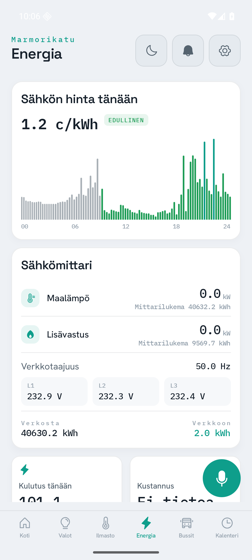
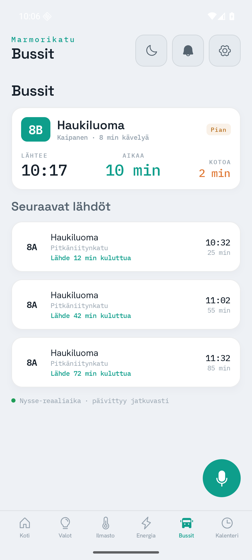
None of those numbers are invented for the screenshot. The app talks to the house continuously over a handful of quiet background channels — live state, commands and questions, the streaming voice and announcements, the bus times — and you never see any of it. You see a room that’s 22.7 degrees, and it’s 22.7 degrees. (If you want the real plumbing — the five transports, the reconciler, the token-compiled design system — it’s all in Part 4, the architecture deep-dive.)
The story I like best: the lights that count to themselves
Here is the kind of thing you only learn by building against a real house, and it became my favourite small story of the whole project.
When you tap a light off in the app, you want it to go off immediately on screen — not spin for a second while the message travels to the controller and back. So Claude built what’s called optimistic control: the app assumes success, flips the switch on screen right away, and then quietly waits for the house to confirm it really happened. If the confirmation doesn’t arrive within twenty seconds, the app sheepishly flips it back and admits it failed.
Simple enough. Except that when we tested it against the real controller, commands started going missing. Not all of them — just some, occasionally, with no error anywhere. We’d send eight and the house would receive seven. The culprit turned out to be beautifully mundane: the light controller is an industrial box that scans its inputs on a fixed cycle, and if you fire commands at it faster than it can look, it simply drops the ones it didn’t catch. The fix was to make the app pace itself — wait 150 milliseconds between commands, roughly a blink, so the controller never gets flooded.
Eight commands, fired as fast as possible: seven arrived. Eight commands, spaced a blink apart: all eight arrived. We wrote that measurement into an automated test so it can never quietly break again.
I love that story because it’s the opposite of the thing people fear about AI-written software — that it’s all confident theory with no contact with reality. This was the reverse. The theory was fine; the house taught us something, and the app now carries that lesson.
Watching the heat pump
The screen I check most in winter is the ground-source heat pump: the temperatures it’s moving around, whether the compressor is running, how much power it’s drawing — all decoded live and laid out plainly. In a cold snap it’s oddly reassuring just to watch it work.
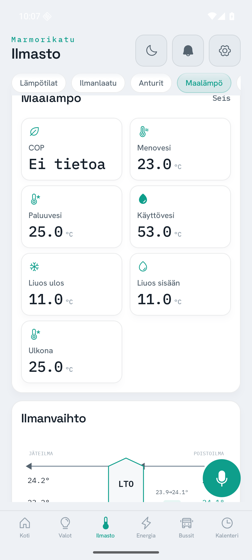
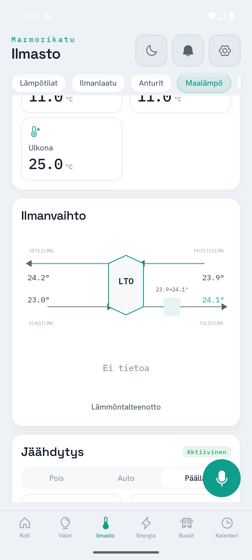
There’s a bit of honesty I insisted on here: when a sensor feed goes quiet, the app shows “Ei tietoa” — “no data” — rather than freezing the last number it saw and pretending. A dashboard that lies is worse than one that admits ignorance.
“Turn on the billiard-table light”
The feature that makes visitors raise an eyebrow is the voice assistant. You hold a button, speak — in Finnish — and the house does the thing and talks back in a warm, slightly synthetic voice. The canonical demo, the one Claude and I ran over and over, is “Sytytä biljardipöydän valo” — “turn on the billiard-table light.” You say it; the light comes on; the house confirms it out loud.
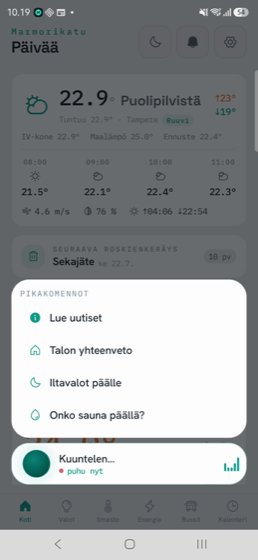
Behind that is a small pipeline the app can run two ways. The nice-sounding path records what you said, sends it to a little server at home that transcribes Finnish speech, works out what you wanted, does it, and streams a spoken reply back sentence by sentence in the same “house voice” the hallway kiosk uses. There’s also a fallback that uses the phone’s own built-in speech features when the home server isn’t reachable. It is, I’ll admit, mostly a party trick. But it’s our party trick, it speaks our language, and the kids adore it. (The full pipeline — transcription, the tool call, the streamed voice — is in Part 4.)
What “two days” really means
I should be honest about the headline, because I’ll repeat it in the other two parts. “Built in two days” is true and also slightly generous. The work happened in four concentrated pushes across a long July weekend. The functional core — a real app, on a real phone, controlling real lights, answering in Finnish — genuinely existed at the end of the first day. What came after was the iOS wall tablet, the kids’ mode, the voice polish, a lot of chasing down numbers that looked wrong, and the sort of finishing that makes something feel finished. Call it two days of build and a couple more of loving refinement.
The thing it replaced — that slow web page on the hallway tablet — is gone now. This is what greets us in the morning and what the kids shout at when they want the lights off — comfortably the most-used thing I’ve ever built for our own home. And it exists because for two days I had a collaborator who could type much faster than me and never got tired.
In Part 2 I’ll get into how it ended up looking like one considered thing rather than a hobby project — the design system, and the strange moment where one AI handed finished design work to another. And in Part 3, the messy, funny, genuinely surprising reality of directing a machine to build your home.