The Kiosk That Greets You: AI Avatar, Daily Briefings, and MCP Home Automation
The marmorikatu-home-automation project started as a Grafana dashboard for HVAC data. It ended up with a wall-mounted touchscreen kiosk that detects when someone walks past, greets them with a hand-drawn animated avatar, delivers a once-daily Finnish briefing on news, weather, calendar events, and home sensor status — and then waits for questions. Here's how the avatar, the daily report, and the MCP architecture fit together.
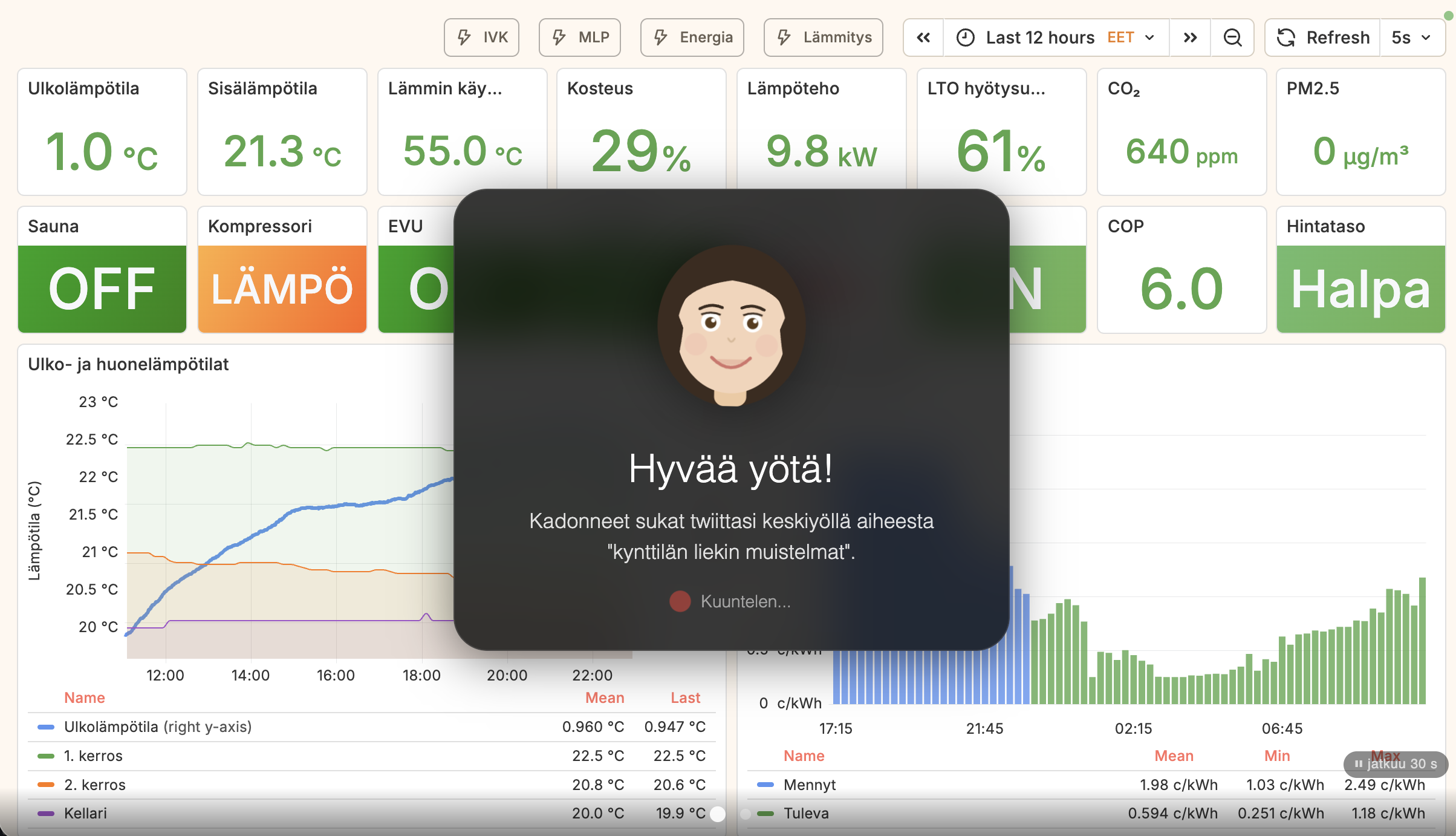
The avatar
The kiosk's face is a hand-drawn SVG character embedded directly in kiosk/index.html. It is a 120×120 viewBox figure — brown hair with styled bangs and side pieces, brown iris eyes with white highlights, a rose-colored mouth, and subtle blush circles. No external assets, no canvas, no three.js — just paths and ellipses in a <svg> tag that the browser renders natively.
Three CSS animation states drive the expressiveness. In the idle state, only the eyes animate: a blink every four seconds, achieved by scaling the eyelid paths over a 200ms window at the 94–96% keyframes of the cycle. In the speaking state (triggered when the TTS audio starts playing), the mouth scales between scaleY(0.5) and scaleY(1.4) on a 300ms cycle, and the entire avatar element bobs on a 1.2s cycle — ±3px vertical, ±1.5° rotation. In the listening state (waiting for speech input), the animation slows to a gentler 2s pulse and a red microphone indicator pulses at 1.5s intervals.
The avatar's lifecycle is controlled by face-api.js running TinyFaceDetector on the camera feed every 500ms. Appearance requires three consecutive positive detections — roughly 1.5 seconds of a face being present — which prevents flickering on brief passers-by. Dismissal requires eight consecutive negative detections, about four seconds, so walking briefly out of frame doesn't interrupt an ongoing interaction. The maximum session length is five minutes; the avatar also listens for Finnish farewell words (heippa, näkemiin, moikka) and dismisses itself accordingly.
On appearance, the avatar expands from a minimized 52×52px position at the bottom-right corner of the screen to a centered 160×160px greeting card. The transition uses CSS transform and opacity so it's GPU-accelerated and doesn't reflow the rest of the layout.
The daily report
Once per calendar day, if the avatar has appeared and the user has been silent for five seconds after the greeting, the kiosk delivers an unprompted briefing. The five-second silence threshold is deliberate: it lets people who want to ask a specific question do so immediately, while giving those who just walked past a moment to orient themselves before the assistant speaks.
The report date is stored as YYYY-MM-DD in lastReportDate. A new day clears it; the report fires at most once regardless of how many times a face is detected that day. The trigger sends a fixed Finnish prompt to the /api/chat endpoint:
"Hae päiväraportti get_daily_report-työkalulla ja tiivistä se lyhyeksi
katsaukseksi. Aloita tärkeimmästä uutisesta, sitten sää, kodin tilanne
ja kalenterin tapahtumat. Älä luettele lukemia, vaan kerro olennainen."
Fetch the daily report with the get_daily_report tool and summarize it into a brief overview. Start with the most important news, then weather, home status, and calendar events. Don't list numbers — tell what matters.
The get_daily_report MCP tool in scripts/mcp_tools/daily_report.py aggregates four data sources in parallel:
- Weather (FMI Open Data): current temperature, feels-like, WMO condition code, wind, humidity, plus a two-day forecast with high/low and precipitation probability.
- News (YLE RSS): up to 10 headlines with title, source, relative publication time, and a 255-character description. The tool concatenates them into a single topic summary string the LLM can scan before deciding which is the lead story.
- Calendar (iCal + PJHOY API): today's and tomorrow's events from the family calendar and garbage collection schedule, formatted as summary, time range or "koko päivä" (all day), and location. The school calendar is deliberately excluded.
- Home status (InfluxDB Flux): outdoor temperature from the HVAC measurement, living room and kitchen Ruuvi sensor readings (last hour), heat pump compressor and auxiliary heater state, supply and hot water temperatures, CO₂ in ppm with a three-tier label (hyvä/kohtalainen/huono), and PM2.5 particulate with the same label scale.
The LLM — either qwen3.5:9b on the local Ollama instance or Claude Haiku 4.5 as fallback — receives the structured JSON and synthesizes a three-to-five sentence Finnish briefing. The system prompt instructs it to omit raw numbers in favour of narrative relevance: "it will rain tomorrow afternoon" rather than "precipitation probability 73%". The avatar speaks the result via Piper TTS while animating in the speaking state.
The MCP architecture
The setup has two MCP servers running as Docker services on the home network. The building automation server (mcp_server.py, port 3001) exposes 15+ tools over SSE transport using the Python MCP SDK with Starlette/uvicorn. Tool modules are organized by domain: schema and query tools (describe_schema, query_data, get_latest, get_statistics), HVAC tools (get_heat_recovery_efficiency, get_freezing_probability), heat pump tools (get_thermia_status, compare_indoor_outdoor), energy tools (get_energy_consumption), and the daily report tool.
The second server is the wago-webvisu-adapter MCP (port 3002), which exposes three tools for the 47 WAGO light switches: list_lights, get_light_status, and toggle_light. Both are registered in Claude Desktop:
{
  "mcpServers": {
    "building-automation": { "url": "http://localhost:3001/sse" },
    "wago-webvisu":        { "url": "http://localhost:3002/sse" }
  }
}
The claude-bridge service — the backend for the kiosk's /api/chat endpoint — maintains persistent SSE connections to both servers with exponential-backoff reconnection (5s to 60s) and five-minute health checks. It aggregates tool lists from both servers and runs the agentic loop: send message + tools to the LLM, execute any tool calls via the MCP connection, feed results back, repeat up to 10 iterations per request. <think> tags and markdown are stripped from the response before it reaches the kiosk.
For the kiosk, the tool set offered to Ollama is deliberately reduced: the low-level schema introspection tools (describe_schema, list_measurements, query_data, get_time_range, get_statistics, get_thermia_register_data) are excluded. The local 9B model handles the domain-specific tools reliably; the raw Flux query tools require stronger reasoning to use correctly, so those are reserved for Claude Desktop where the full model is available.
TTS and voice pipeline
Speech synthesis uses Piper running locally in the claude-bridge Docker container: the fi_FI-asmo-medium model (AsmoKoskinen voice, 22050 Hz mono 16-bit PCM). The /tts endpoint receives text, splits it on sentence boundaries (.!? followed by an uppercase letter), and streams each sentence as a base64-encoded WAV inside a newline-delimited JSON response. The browser plays each WAV chunk as it arrives, so the avatar starts speaking before the full response has been synthesized.
A 64-entry LRU cache keyed on the MD5 hash of each sentence avoids re-synthesizing greetings and common responses. iOS required special handling: a persistent <audio> element and silent utterances every ten seconds prevent the browser from suspending the audio context between interactions.
Speech recognition uses the Web Speech API (fi-FI) on Chrome and Edge, with a 15-second hard timeout and 1.5-second silence detection. Safari falls back to MediaRecorder sending WebM/MP4 to a /transcribe endpoint backed by faster-whisper (base model, int8 quantization, beam size 3).
The safety boundary
The sauna heater, the alarm system, and the underfloor heating thermostats run on direct automation rules — none of them are MCP-accessible. The failure mode for a misinterpreted command to a light switch is a light in the wrong state for a few seconds. The failure mode for an LLM command affecting the sauna heater at 3am is a different category. The boundary is simple: sensor reads and light control yes, high-power heating and security no. Not every actuator that is technically wrappable as a tool should be.
describe_schemais the most important tool in the set. It lets the LLM know that outdoor temperature lives in theruuvimeasurement with tagsensor_name: "Ulkolämpötila"before it tries to query anything. Without it, the model guesses at field names and gets them wrong. The tool that orients the agent is worth more than the tools that do the actual work.