Directing the Machine: A Two-Day Diary
The first two parts were about the finished thing. This one is about the sausage-making: what it’s genuinely like to sit for two days and steer an AI through building a real app. It is less heroic and much funnier than you’d think. There was a lot of “go on.” There were sausages. There was a sauna that appeared to be using a bathtub of electricity per hour.
- Part 1 · The build — what the app actually does
- Part 2 · The design — one look across three very different screens
- Part 3 · The workflow — what it’s like to direct a machine for two days (you are here)
- Part 4 · The architecture — the engineer’s deep-dive
I’ve now built a couple of things this way, and the single most surprising discovery is how little I typed. I went back through the logs of this project out of curiosity. Over the whole build I sent the AI a little over a hundred written instructions — and more than two hundred screenshots. I was directing mostly by pointing. Take a picture of the screen, circle the problem in my head, add a sentence, send. “The microphone is showing up on both the left and the right in landscape.” “Everything is rendered too small, almost half the size it should be.” Claude would look at the picture and fix it.
And an embarrassing amount of what I typed wasn’t even instructions. It was “go on.” “done.” “yes, both.” “continue with the polish.” The rhythm of it is less like commanding a computer and more like sitting next to a very fast, very literal colleague, occasionally grunting approval while they work.
How a day actually went
The pattern that emerged, without me planning it, looked like this. I’d describe a chunk of the app in a sentence or two. Claude would often go quiet and send off its own little team of helper agents to investigate first — reading the existing house software to learn exactly how the lights or the heat pump really worked before writing a line. Then it would build the thing. Then it would install the new version onto the actual phone on my desk and the actual tablet, and I’d go look, take a screenshot, and tell it what was wrong. (The orchestration underneath — scout, plan and implement agents running in parallel — is in Part 4.)
The loop was never “does the code compile.” It was “does the house behave.” Every change went onto real hardware, pointed at the real broker, and got judged by whether the light in the actual room did the right thing.
That grounding is, I think, the whole reason it worked. It’s easy to imagine an AI writing plausible nonsense. It’s much harder for the nonsense to survive being installed on a phone and tested against a light switch you can see from your chair.
The sauna that used a bathtub of electricity
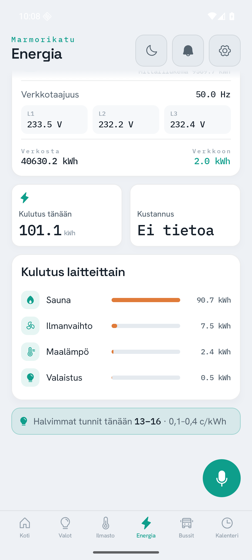
My favourite bug, and a good example of why a human still has to be in the loop, was the sauna. At one point the energy screen cheerfully informed me that the sauna had drawn 356.8 kilowatt-hours. For a sense of scale: that’s roughly a fortnight of a normal household’s entire electricity use, attributed to one sauna session. I typed, more or less, “the app says the sauna used 356.8 kWh, which can’t be true,” and that was enough. Claude went digging and found the culprit: the app was reading the right number from the wrong place, because two different systems in the house label their data slightly differently — one calls a room by one name, the other by another. The AI could write flawless code to display a number; it could not know that the number was absurd. I could. That’s the division of labour in a sentence.
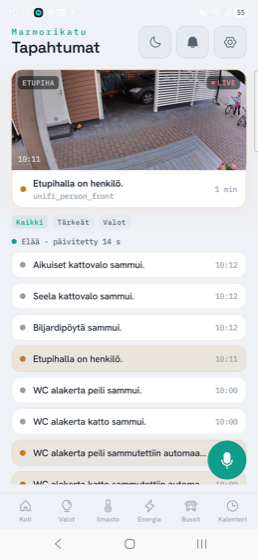
There were plenty more like it. The tablet at first rendered everything at half size, marooned in the corner of the screen. On the iPhone, a wall of system security pop-ups appeared that I couldn’t dismiss. Numbers flashed when they shouldn’t and sat still when they should have pulsed. None of these are failures of “the AI can’t code.” They’re the ordinary friction of software meeting real devices — the same friction any human team hits — except the fixes came back in minutes, and I never once opened the code myself.
The Apple tax, paid in real time
Not everything was smooth, and I promised candour. The Apple side of things fought us. Halfway through the first day I had to stop and install Apple’s developer tools before the iOS build could even happen — there’s a lovely moment in the logs where I just type “xcode has been installed now” like a man reporting for duty. A particular building-block library we depended on only existed for very recent versions of the underlying language, which dragged the whole project onto bleeding-edge tools and produced a run of cryptic errors that took real patience to work through. But the destination made the fight worth it: the app now runs flawlessly on the physical iPad bolted to our hallway wall — the kiosk it was always meant to become. All that friction was in the getting there, not the arriving.
What it’s like, honestly
People imagine directing an AI to build software is either magic or fraud. It’s neither. It’s a collaboration, with a very particular shape. The machine is tireless, fast, and genuinely inventive — it proposed the self-pacing lights fix, it invented an entire icon set when one was missing, it flagged that the app should refuse to write to the heat pump before I’d thought about it. But it has no skin in the game and no common sense about my house. It doesn’t know that 356 kilowatt-hours is ridiculous, or that the lights in one room are for reading and the ones in another are just decorative. That judgement — taste, context, knowing what “right” means for this particular family — is the part that stayed firmly mine.
The division that emerged: Claude brought the tirelessness and the craft; I brought the taste and the reality check. Two days of that, and the ugly web page in the hallway was gone.
The only review that matters
Here is the ending I care about. The app is not a demo. It’s installed on the family’s phones and running on the tablet by the front door, and it’s the thing we actually use. The kids don’t know or care that an AI wrote it. They know that there’s a big button that listens, and that if you tell the house to turn off the lights, it does, and answers you in Finnish. Watching a six-year-old boss the house around through a thing you “built” in a weekend — by mostly saying “go on” to a machine — is a genuinely strange and wonderful feeling.
Day in, day out, it’s the most-used thing I’ve ever built for our own home — and I wrote almost none of it. Both of those statements are true, and I’ve decided to be delighted by that rather than unsettled.
This is the last of the three story parts. If you came straight here, Part 1 covers what the app does and Part 2 covers how it got its look. And if you’d like to see this same “point at a machine and a thing appears” approach taken somewhere far less sensible — a whole video game — that’s a different story entirely.